


TechHaven| BowPro® Keyboard
TechHaven| BowPro® Keyboard
✦ Zero-lag Bluetooth connection – Broadcom chip
🔋 2-hour charge = 45 hours use or 90 days standby
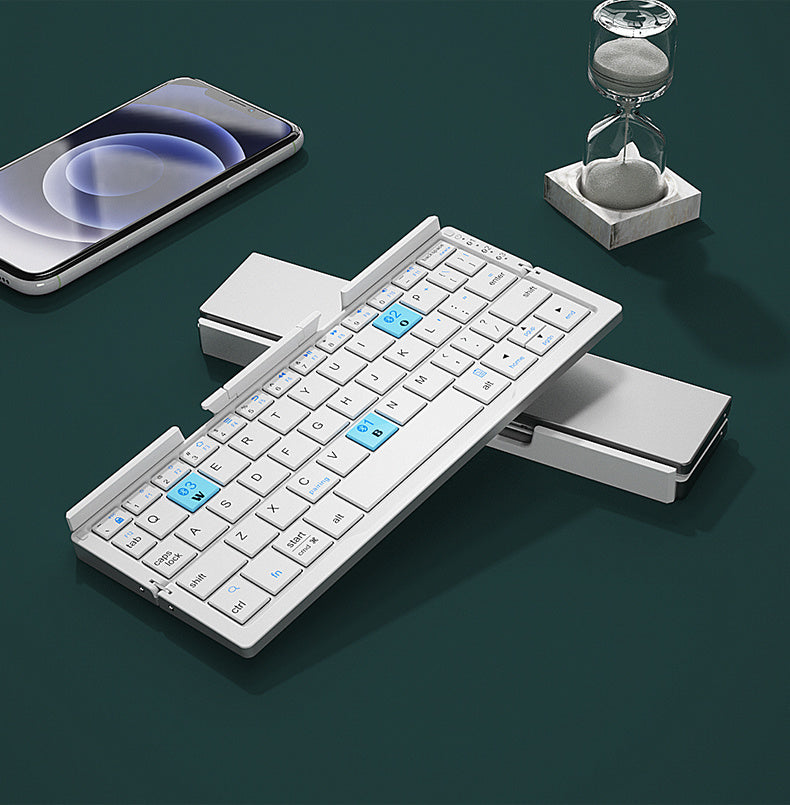
📐 Folds down to palm size – fits in your pocket
🗂️ Built-in magnetic stand – no extra accessories needed


Product Description

Product Description
Technical Specifications
Complete technical details for your TechHaven| BowPro Keyboard
| Material | Premium ABS Plastic + Aluminum Alloy |
| Connection | Bluetooth (Broadcom chip) – up to 10m |
| Keyboard Type | Chiclet scissor-switch |
| Number of Keys | 60 keys – compact optimized layout |
| Key Surface | Matte finish – anti-fingerprint, non-slip |
| Battery Life | ⭐45+ hours active 90 days standby |
| Charge Time | ~2 hours (full charge) |
| Battery Capacity | 160mAh Li-ion rechargeable |
| Auto Sleep | After 10 minutes idle – wakes on any keypress |
| Built-in Stand | ⭐Magnetic hidden bracket Supports up to 11" |
| Fold Design | Horizontal fold Pocket-size |
| Compatibility | iOS · Android · Windows · macOS · HMS |
| Wireless Range | Up to 10 meters |
| Warranty | 1 Year Guarantee |
Package Includes

Package Includes
- Foldable Bluetooth Keyboard ×1
- Built-in Magnetic Stand (integrated)
- Micro USB Charging Cable ×1
- User Manual ×1
Couldn't load pickup availability
- Apple pay payment method
- Discover payment method
- Google pay payment method
- Master payment method
- Paypal payment method
- Visa payment method
- Shopify pay payment method

Get it between - and -.
"Why Buy From Us" / "Our Guarantees"

"Why Buy From Us" / "Our Guarantees"
🔒 Worry-Free Purchase – Our 100% Guarantee
- ✅ 30-Day Easy Returns – Don’t like it? Send it back, no questions asked.
- ✅ 12-Month Warranty – We cover all manufacturing defects.
- ✅ Free Tracked Shipping – Fast, trackable delivery to your door.
- ✅ Secure Checkout – SSL encrypted + Credit/PayPal/Shop Pay protection.
Shipping & Returns

Shipping & Returns
📦 Shipping Policy
- Processing time: 1–2 business days
- Delivery time: 6–12 business days (US, CA, UK, EU)
- Tracked shipping on all orders
- Partnered with USPS / Royal Mail / Canada Post (mention real carriers)
🔁 Return & Refund Policy
- 60-day return window
- Product must be unused & in original packaging
- How to request: email support@techhavenstore.net
🛡 Warranty Policy
- 1-year limited warranty
- Covers all manufacturer defects
- Doesn’t cover accidental or water damage


21,683+ happy customers ⚡ 147 sold today
✓ 1-Year Warranty
21,683+ happy customers ⚡ 147 sold today
✓ 1-Year Warranty
21,683+ happy customers ⚡ 147 sold today
✓ 1-Year Warranty
21,683+ happy customers ⚡ 147 sold today
✓ 1-Year Warranty
21,683+ happy customers ⚡ 147 sold today
✓ 1-Year Warranty
21,683+ happy customers ⚡ 147 sold today
✓ 1-Year Warranty
21,683+ happy customers ⚡ 147 sold today
✓ 1-Year Warranty
21,683+ happy customers ⚡ 147 sold today
✓ 1-Year Warranty
21,683+ happy customers ⚡ 147 sold today
✓ 1-Year Warranty
21,683+ happy customers ⚡ 147 sold today
✓ 1-Year Warranty
21,683+ happy customers ⚡ 147 sold today
✓ 1-Year Warranty
21,683+ happy customers ⚡ 147 sold today
✓ 1-Year Warranty
21,683+ happy customers ⚡ 147 sold today
✓ 1-Year Warranty
21,683+ happy customers ⚡ 147 sold today
✓ 1-Year Warranty
21,683+ happy customers ⚡ 147 sold today
✓ 1-Year Warranty
21,683+ happy customers ⚡ 147 sold today
✓ 1-Year Warranty
Join 21,683+ People Who
Type FASTER From Their Phone, iPad


DESIGN
Experience the slim, matte-finish build that makes BowPro look as good as it performs. Built from durable ABS + Aluminum Alloy, it blends everyday toughness with clean minimalism — turning any workspace into a statement.
PERFORMANCE
Driven by a Broadcom Bluetooth chip for instant, zero-lag response on every keystroke. The scissor-switch key structure delivers a smooth, quiet, laptop-grade typing feel — wherever you are.

BATTERY
Charge for 2 hours. Type for 45 hours straight — or keep it on standby for 90 days. Smart auto-sleep after 10 minutes idle means every drop of battery goes exactly where you need it.

FLEXIBILITY
Works with iOS, Android, Windows, macOS and HMS right out of the box. Folds to pocket size in seconds, with a built-in magnetic stand that holds any screen up to 11 inches — no extra accessories needed.

WHY CHOOSE TechHaven™?
TechHaven™ BowPro® Keyboard vs. Regular Bluetooth Keyboards
| Feature |
TechHaven™ BowPro® Keyboard
⭐ BEST VALUE
$89.90
|
Regular BT Keyboard
$149.99
avg. market price
|
| Price | $89.90 | $149.99 |
| You Save | ✅ $60.09 | — |
| Foldable Pocket-Size | ✅ | ❌ |
| Battery Life | ⭐ 45+ hours | ~10 hours |
| Standby Time | ⭐ 90 days | ~30 days |
| Built-in Phone Stand | ✅ | ❌ |
| Zero-Lag Chip | Broadcom Pro | Generic |
| Key Structure | Scissor-switch | Membrane |
| Device Compatibility | iOS · Android · Windows · macOS · HMS | Limited |
| Warranty | 1 Year | 90 days |
| Free Returns | ✅ 30 days | ❌ |
Transform Your Typing Experience
TechHaven™ BowPro® – Not just a keyboard. Your portable productivity companion. Where speed, silence, and simplicity unite. The future of mobile typing, in your pocket.
 TYPE WITHOUT LIMITS

Phone meets laptop power. Scissor-switch keys and a Broadcom zero-lag chip put total control at your fingertips.
 FOLD YOUR WAY

Flip. Fold. Go. Pocket-size freedom lets you switch devices in seconds — built for creators on the move.
 POWER THAT LASTS

Work smarter, longer. 45+ hours of battery. Zero-lag connection. 90-day standby. Your ideas won't wait — neither should you.
 BUILT FOR EVERY DEVICE

One keyboard. Every screen. iOS, Android, Windows, macOS — connect instantly, type immediately. No setup. No limits.


⚡ Laptop-Level Typing
🔋 90-Day Standby Battery
📐 Pocket-Size Portability
⚡ Laptop-Level Typing
🔋 90-Day Standby Battery
📐 Pocket-Size Portability
⚡ Laptop-Level Typing
🔋 90-Day Standby Battery
📐 Pocket-Size Portability
⚡ Laptop-Level Typing
🔋 90-Day Standby Battery
📐 Pocket-Size Portability
⚡ Laptop-Level Typing
🔋 90-Day Standby Battery
📐 Pocket-Size Portability
⚡ Laptop-Level Typing
🔋 90-Day Standby Battery
📐 Pocket-Size Portability
⚡ Laptop-Level Typing
🔋 90-Day Standby Battery
📐 Pocket-Size Portability
⚡ Laptop-Level Typing
🔋 90-Day Standby Battery
📐 Pocket-Size Portability
⚡ Laptop-Level Typing
🔋 90-Day Standby Battery
📐 Pocket-Size Portability
⚡ Laptop-Level Typing
🔋 90-Day Standby Battery
📐 Pocket-Size Portability
⚡ Laptop-Level Typing
🔋 90-Day Standby Battery
📐 Pocket-Size Portability
⚡ Laptop-Level Typing
🔋 90-Day Standby Battery
📐 Pocket-Size Portability
FAQ answers...

Which devices is this keyboard compatible with?

Which devices is this keyboard compatible with?
Works with iOS, iPadOS, Android, Windows, macOS, and HMS. Compatible with iPhone, iPad, Samsung, Xiaomi, Huawei, MacBook, Surface, and any Windows laptop or tablet.
How do I pair it for the first time?
How do I pair it for the first time?
Turn on the keyboard → open Bluetooth settings on your device → find "TechHaven" (or a device code on some Android phones) in the list → tap to connect. Done in under 30 seconds, no app needed.
My keyboard suddenly won't connect — what do I do?
My keyboard suddenly won't connect — what do I do?
Go to your device's Bluetooth settings → delete/forget the keyboard → turn the keyboard off and back on → press Fn + Bluetooth key to re-enter pairing mode → reconnect as normal. This fixes 95% of connection issues.
Is the battery life really 45 hours / 90 days?
Is the battery life really 45 hours / 90 days?
45 hours is continuous active typing. 90 days is standby mode. With normal use of 1–2 hours per day, expect 4–6 weeks per charge. The keyboard auto-sleeps after 10 minutes idle to save power.
Are the keys too small to type on?
Are the keys too small to type on?
The 60-key compact layout is designed for average and smaller hands — great for students and smartphone users. Keys use a matte finish for clear tactile feel. Note: there is no dedicated number row.
Does the built-in stand support all iPads and tablets?
Does the built-in stand support all iPads and tablets?
The magnetic hidden bracket supports screens up to 11 inches. For larger screens (12.9" iPad Pro etc.), the keyboard still works — just prop your screen separately.
Will the keyboard work with a phone or tablet inside a thick case?
Will the keyboard work with a phone or tablet inside a thick case?
Very thick cases may not sit properly in the stand bracket. For best results, use with slim cases or caseless devices.
How do I charge it? What cable does it use?
How do I charge it? What cable does it use?
Plug in the included charging cable (Micro USB / USB-C). A full charge takes about 2 hours. You can check battery status by the LED indicator on the keyboard.
Does it work while charging?
Does it work while charging?
Yes, you can type while the keyboard is plugged in and charging.
Is it compatible with Android phones that show a code instead of a name?
Is it compatible with Android phones that show a code instead of a name?
Yes. Some Android devices display a Bluetooth code (e.g. 19:16:4A:77:9E) instead of the keyboard name — this is normal. Just select that code in your Bluetooth list to connect.